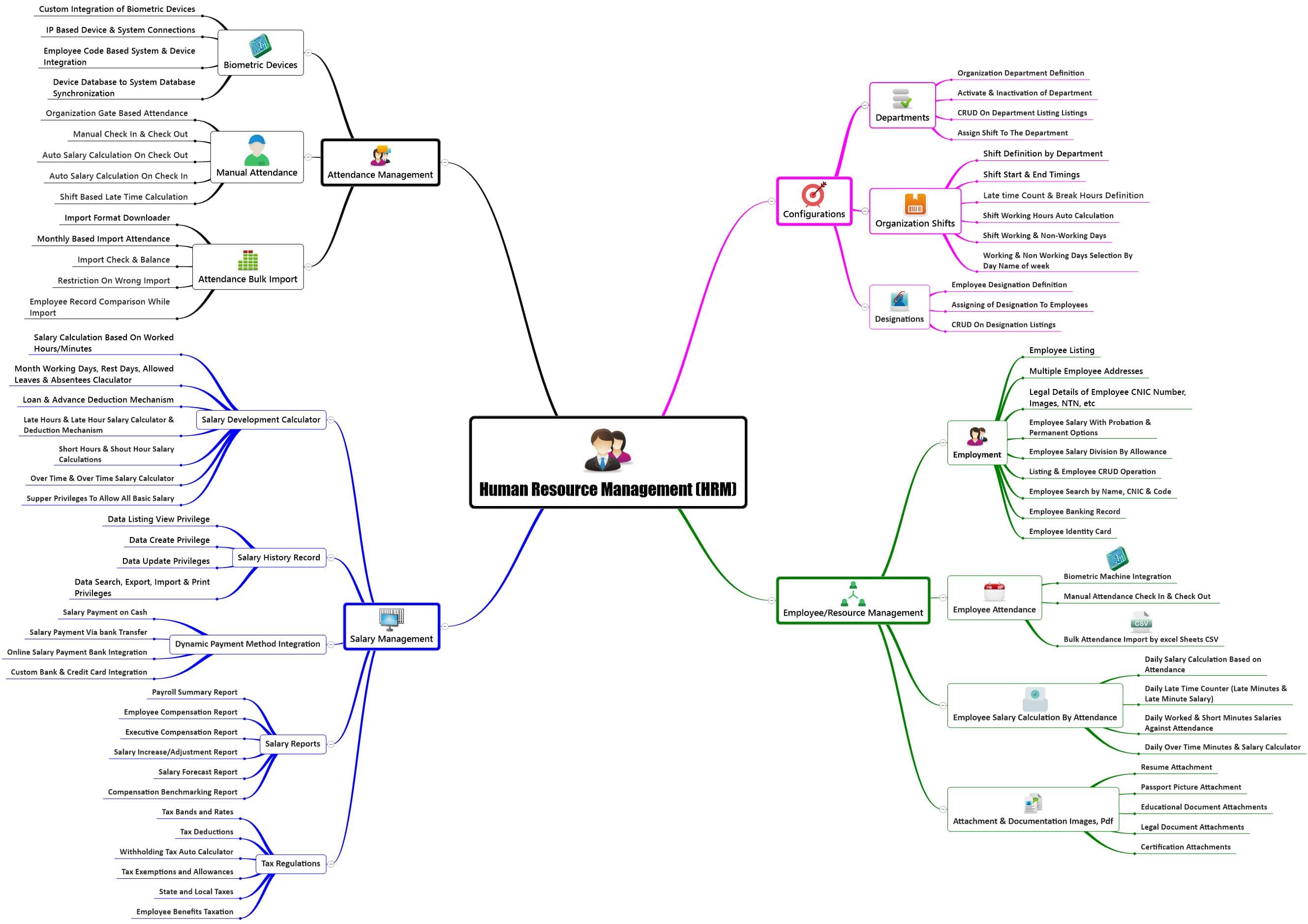
Human Resource Management System

A comprehensive Human Resource Management System designed by ATOZERP, offering robust features for streamlined attendance and salary management, tax compliance, and employee or resource administration. Efficiently track attendance through biometric devices, manual entries, and bulk imports. Ensure seamless integration with IP-based connections, employee codes, and synchronization between device and system databases. Facilitate salary development with a calculator, considering worked hours minutes, monthly working days, and deductions. Maintain a detailed salary history and generate reports. — from PKR 24.99 / monthly

Human-Resource Management System

1. Attendance Management

rnrn

1.1 Biometric Devices

rnrn

1.1.1 Custom Integration of Biometric Devices

rn rn

ATOZERP excels in providing tailored integration of biometric devices, ensuring a seamless attendance tracking system. By customizing the integration process, we address the unique needs of your organization, guaranteeing accuracy and efficiency in employee attendance recording.

rnrn

1.1.2 IP Based Device & System Connections

rn rn

Our system offers secure and real-time synchronization between biometric devices and the central system through IP-based connections. This feature enhances the reliability and efficiency of attendance data management across the organization.

rnrn

1.1.3 Employee Code Based System & Device Integration

rn rn

ATOZERP allows for the integration of biometric devices based on employee codes, providing a flexible and personalized approach to attendance tracking. This ensures accurate and organized records for each employee.

rnrn

1.1.4 Device Database to System Database Synchronization

rn rn

Maintaining consistency between device and system databases is crucial. ATOZERP achieves this through seamless synchronization, ensuring that the attendance data across devices and the central system is always up-to-date and accurate.

rnrn

1.2 Manual Attendance

rnrn

1.2.1 Organization Gate Based Attendance

rn rn

For organizations that prefer manual attendance tracking, ATOZERP provides a gate-based system. This allows for easy and efficient manual recording of employee attendance at designated entry points, ensuring comprehensive coverage.

rnrn

1.2.2 Manual Check In & Check Out

rn rn

Flexibility is key in attendance management. ATOZERP accommodates organizations with manual check-in and check-out options, providing employees with the convenience of manually recording their attendance.

rnrn

1.2.3 Auto Salary Calculation On Check Out

rn rn

ATOZERP automates salary calculations upon employee check-out, streamlining the payroll process. This feature ensures that employees are compensated accurately based on their attendance records.

rnrn

1.2.4 Auto Salary Calculation On Check In

rn rn

Similarly, salary calculations are automated upon employee check-in. This not only saves time but also reduces the likelihood of errors in payroll processing, promoting accuracy and transparency.

rnrn

1.2.5 Shift Based Late Time Calculation

rn rn

To account for punctuality, ATOZERP calculates late hours based on employee shifts. This feature provides organizations with precise information on late arrivals, facilitating fair and consistent attendance management.

rnrn

1.3 Attendance Bulk Import

rnrn

1.3.1 Import Format Downloader

rn rn

ATOZERP simplifies the attendance data import process by providing a convenient format downloader. This ensures that organizations have the correct template for importing data, minimizing errors during the process.

rnrn

1.3.2 Monthly Based Import Attendance

rn rn

The bulk import feature extends to monthly attendance data. Organizations can efficiently import large sets of data, saving time and effort in managing attendance records on a monthly basis.

rnrn

1.3.3 Import Check & Balance

rn rn

Rigorous checks are implemented during the import process to maintain data accuracy. ATOZERP ensures that only valid and properly formatted data is imported, reducing the risk of errors in attendance records.

rnrn

1.3.4 Restriction On Wrong Import

rn rn

To further enhance data accuracy, ATOZERP imposes restrictions on incorrect imports. This feature prevents the introduction of inaccurate data, maintaining the integrity of the attendance records.

rnrn

1.3.5 Employee Record Comparison While Import

rn rn

ATOZERP goes a step further by comparing employee records during the import process. This ensures consistency and identifies any discrepancies that may need attention, providing a proactive approach to data quality.

rnrn

2. Salary Management

rnrn

2.1 Salary Development Calculator

rnrn

2.1.1 Salary Calculation Based On Worked Hours/Minutes

rnrn

ATOZERP's salary development calculator accurately calculates salaries based on worked hours and minutes. This precision ensures that employees are fairly compensated, aligning with their actual contributions to the organization.

rnrn

2.1.2 Month Working Days, Rest Days, Allowed Leaves & Absentees Calculator

rnrn

The comprehensive salary calculator factors in the number of working days, rest days, allowed leaves, and absenteeism. This ensures precise payroll processing, taking into account various aspects of employee attendance.

rnrn

2.1.3 Loan & Advance Deduction Mechanism

rnrn

ATOZERP streamlines financial processes by incorporating a deduction mechanism for loans and advances. This ensures accurate payroll deductions, minimizing errors and promoting financial transparency.

rnrn

2.1.4 Late Hours & Late Hour Salary Calculator & Deduction Mechanism

rnrn

To encourage punctuality, ATOZERP calculates and manages late hours efficiently. The associated deduction mechanism ensures that latecomers are compensated fairly, maintaining a balance between discipline and employee welfare.

rnrn

2.1.5 Short Hours & Short Hour Salary Calculations

rnrn

For situations involving shorter working hours, ATOZERP's salary calculator adjusts payments accordingly. This feature supports flexibility in employee schedules while ensuring accurate compensation.

rnrn

2.1.6 Over Time & Over Time Salary Calculator

rnrn

Transparently managing overtime, ATOZERP's calculator ensures precise calculations and corresponding salary adjustments. This supports fair compensation for employees who go above and beyond regular working hours.

rnrn

2.1.7 Super Privileges To Allow All Basic Salary

rnrn

Super privileges provide comprehensive access to the entire basic salary structure. ATOZERP offers this feature, enabling authorized personnel to manage and modify the basic salary components with ease.

rnrn

2.2 Salary History Record

rnrn

2.2.1 Data Listing View Privilege

rnrn

ATOZERP grants users the privilege of accessing comprehensive salary history listings. This allows for a detailed review of past salary records, facilitating informed decision-making and historical analysis.

rnrn

2.2.2 Data Create Privilege

rnrn

Authorized users can create and input salary history data, ensuring that the system is up-to-date and reflective of changes in employee compensation over time.

rnrn

2.2.3 Data Update Privileges

rnrn

With ATOZERP, users have the authority to update salary history data. This feature supports the dynamic nature of salary adjustments and ensures accurate records.

rnrn

2.2.4 Data Search, Export, Import & Print Privileges

rnrn

ATOZERP provides flexibility in managing salary history data. Users can search, export, import, and print salary records, facilitating efficient data handling and reporting.

rnrn

2.3 Dynamic Payment Method Integration

rnrn

2.3.1 Salary Payment on Cash

rnrn

ATOZERP accommodates various payment methods, including cash disbursement. This flexibility ensures that organizations can choose the most suitable method for salary payments.

rnrn

2.3.2 Salary Payment Via Bank Transfer

rnrn

Secure salary payments are facilitated through bank transfers. ATOZERP integrates seamlessly with banking systems, promoting efficient and secure transactions.

rnrn

2.3.3 Online Salary Payment Bank Integration

rnrn

For organizations embracing online transactions, ATOZERP integrates with banks to enable secure online salary payments. This feature aligns with modern payment preferences.

rnrn

2.3.4 Custom Bank & Credit Card Integration

rnrn

ATOZERP goes a step further by offering customizable integration options for banks and credit cards. This flexibility ensures that organizations can align payment processes with their specific financial partnerships.

rnrn

2.4 Salary Reports

rnrn

2.4.1 Payroll Summary Report

rnrn

A comprehensive summary report provides a detailed overview of the payroll, enabling organizations to review and analyze financial aspects efficiently.

rnrn

2.4.2 Employee Compensation Report

rnrn

ATOZERP generates detailed reports on employee compensation, offering insights into individual and collective financial contributions.

rnrn

2.4.3 Executive Compensation Report

rnrn

Specialized reports focus on executive compensation structures, providing organizations with a targeted view of top-tier remuneration.

rnrn

2.4.4 Salary Increase/Adjustment Report

rnrn

Reports tracking salary increases and adjustments ensure transparency and support decision-making processes related to employee compensation.

rnrn

2.4.5 Salary Forecast Report

rnrn

Proactive reports forecast future salary structures, allowing organizations to plan and allocate resources effectively.

rnrn

2.4.6 Compensation Benchmarking Report

rnrn

Comparative reports benchmark compensation structures against industry standards, supporting organizations in maintaining competitive remuneration.

rnrn

2.5 Tax Regulations

rnrn

2.5.1 Tax Bands and Rates

rnrn

ATOZERP provides clear information on tax bands and rates, ensuring accurate tax calculations in compliance with regulatory requirements.

rnrn

2.5.2 Tax Deductions

rnrn

Systematic deductions align with tax regulations, supporting organizations in meeting their tax obligations while managing employee compensation.

rnrn

2.5.3 Withholding Tax Auto Calculator

rnrn

An automated calculator for withholding tax streamlines the tax deduction process, ensuring accuracy and compliance with tax regulations.

rnrn

2.5.4 Tax Exemptions and Allowances

rnrn

Comprehensive information on tax exemptions and allowances guides organizations in optimizing tax benefits for both the employer and employees.

rnrn

2.5.5 State and Local Taxes

rnrn

ATOZERP's understanding and management of state and local taxes ensure compliance with regional tax requirements, avoiding legal complications.

rnrn

2.5.6 Employee Benefits Taxation

rnrn

Detailed insights into employee benefits taxation assist organizations in navigating the complexities of tax regulations associated with employee perks and benefits.

rnrn

3. Employee/Resource Management

rnrn

3.1 Employment

rnrn

3.1.1 Employee Listing

rnrn

A comprehensive employee listing feature in ATOZERP facilitates easy access to information about all employees. This organized view streamlines management tasks and provides a quick reference for HR professionals.

rnrn

3.1.2 Multiple Employee Addresses

rnrn

Recognizing the diversity in employee residences, ATOZERP supports the inclusion of multiple addresses for each employee. This ensures thorough documentation and accommodates various contact points.

rnrn

3.1.3 Legal Details of Employee CNIC Number, Images, NTN, etc

rnrn

Legal information, including CNIC numbers, images, and NTN details, is meticulously recorded in ATOZERP. This comprehensive approach supports compliance and regulatory requirements.

rnrn

3.1.4 Employee Salary With Probation & Permanent Options

rnrn

ATOZERP differentiates salary structures based on employment status, offering distinct recording for probationary and permanent employees. This feature ensures accurate financial tracking during transitional periods.

rnrn

3.1.5 Employee Salary Division By Allowance

rnrn

Transparently dividing salaries by various allowances, ATOZERP provides clarity in financial structures. This feature enhances transparency and aids in effective communication of compensation details.

rnrn

3.1.6 Listing & Employee CRUD Operation

rnrn

The ability to perform CRUD (Create, Read, Update, Delete) operations on employee records is integral to efficient management. ATOZERP simplifies these operations, ensuring user-friendly employee data management.

rnrn

3.1.7 Employee Search by Name, CNIC & Code

rnrn

ATOZERP facilitates efficient employee data retrieval through a robust search functionality. Users can locate specific employees using their names, CNIC numbers, or assigned codes, enhancing accessibility.

rnrn

3.1.8 Employee Banking Record

rnrn

Thorough management of employee banking information for salary disbursement is a priority in ATOZERP. This feature ensures accuracy in financial transactions and supports timely salary processing.

rnrn

3.1.9 Employee Identity Card

rnrn

ATOZERP streamlines the generation and maintenance of employee identity cards. This identification tool enhances security measures within the organization and expedites verification processes.

rnrn

3.2 Employee Attendance

rnrn

3.2.1 Biometric Machine Integration

rnrn

Seamless integration with biometric machines ensures accurate attendance tracking in ATOZERP. This feature reduces manual errors and enhances the overall efficiency of attendance management.

rnrn

3.2.2 Manual Attendance Check In & Check Out

rnrn

For situations where manual attendance is preferred, ATOZERP offers check-in and check-out options. This flexibility accommodates varying work environments and preferences.

rnrn

3.2.3 Bulk Attendance Import by Excel Sheets CSV

rnrn

ATOZERP simplifies attendance data management by allowing bulk imports through Excel sheets in CSV format. This feature ensures efficient handling of large datasets.

rnrn

3.3 Employee Salary Calculation By Attendance

rnrn

3.3.1 Daily Salary Calculation Based on Attendance

rnrn

ATOZERP automates daily salary calculations based on precise attendance records. This ensures accurate compensation and reduces the workload on payroll administrators.

rnrn

3.3.2 Daily Late Time Counter (Late Minutes & Late Minute Salary)

rnrn

Transparently calculating late minutes and corresponding salary adjustments, ATOZERP promotes punctuality and ensures fair compensation practices.

rnrn

3.3.3 Daily Worked & Short Minutes Salaries Against Attendance

rnrn

ATOZERP's salary calculation system accounts for both worked and short minutes, providing a balanced approach to compensation based on attendance records.

rnrn

3.3.4 Daily Over Time Minutes & Salary Calculator

rnrn

Transparently calculating daily overtime minutes and corresponding salary adjustments, ATOZERP ensures accurate compensation for extra hours worked.

rnrn

3.4 Attachment & Documentation (Images, PDF)

rnrn

3.4.1 Resume Attachment

rnrn

ATOZERP facilitates the efficient attachment and storage of employee resumes. This feature centralizes documentation and supports comprehensive employee profiles.

rnrn

3.4.2 Passport Picture Attachment

rnrn

Secure attachment of passport pictures enhances identification processes within ATOZERP. This feature contributes to a thorough and secure employee database.

rnrn

3.4.3 Educational Document Attachments

rnrn

ATOZERP allows for the documentation and storage of educational documents for each employee. This comprehensive approach supports verification processes and ensures accurate records.

rnrn

3.4.4 Legal Document Attachments

rnrn

The secure storage and management of legal documents pertaining to each employee are priorities in ATOZERP. This feature supports compliance with legal requirements and enhances organizational transparency.

rnrn

3.4.5 Certification Attachments

rnrn

Inclusion and documentation of employee certifications within ATOZERP contribute to a holistic view of each employee's qualifications. This feature supports employee development initiatives and ensures up-to-date records.

rn

4. Configurations

rnrn

4.1 Departments

rnrn

4.1.1 Organization Department Definition

rnrn

ATOZERP facilitates clear organization department definitions. This foundational feature ensures that departments are accurately outlined within the system, providing a structured framework for the entire organization.

rnrn

4.1.2 Activate & Inactivation of Department

rnrn

Offering flexibility in organizational structure, ATOZERP allows for the activation or inactivation of departments. This feature ensures that the system adapts to organizational changes, supporting dynamic configurations.

rnrn

4.1.3 CRUD On Department Listing Listings

rnrn

ATOZERP simplifies department management by enabling CRUD operations on department listings. This user-friendly functionality empowers administrators to create, read, update, and delete department information as needed.

rnrn

4.1.4 Assign Shift To The Department

rnrn

Efficiently assigning shifts to departments is a priority in ATOZERP. This feature ensures that each department operates with designated working hours, contributing to streamlined attendance and payroll processes.

rnrn

4.2 Organization Shifts

rnrn

4.2.1 Shift Definition by Department

rnrn

Clear shift definitions by department in ATOZERP ensure that each department operates with unique scheduling parameters. This customization supports diverse working hours within the organization.

rnrn

4.2.2 Shift Start & End Timings

rnrn

ATOZERP accurately records shift start and end timings, providing a foundational element for attendance and payroll calculations. This ensures precise tracking of employee working hours.

rnrn

4.2.3 Late time Count & Break Hours Definition

rnrn

Defining late time counts and break hours in ATOZERP ensures accuracy in attendance management. This feature supports disciplinary measures and ensures compliance with organizational policies.

rnrn

4.2.4 Shift Working Hours Auto Calculation

rnrn

The automated calculation of shift working hours in ATOZERP streamlines payroll processes. This feature contributes to accurate salary calculations based on predefined working hours.

rnrn

4.2.5 Shift Working & Non-Working Days

rnrn

Distinction between working and non-working days within each shift is a vital feature in ATOZERP. This customization ensures that the system aligns with organizational scheduling requirements.

rnrn

4.2.6 Working & Non-Working Days Selection By Day Name of week

rnrn

Offering flexibility in working and non-working day selection by the day name of the week, ATOZERP accommodates diverse scheduling needs. This feature ensures that organizations can tailor their shift structures based on operational preferences.

rnrn

4.3 Designations

rnrn

4.3.1 Employee Designation Definition

rnrn

ATOZERP provides clear definitions and categorizations of employee designations. This foundational feature ensures that each employee's role is accurately reflected within the system.

rnrn

4.3.2 Assigning of Designation To Employees

rnrn

Efficiently assigning designations to employees in ATOZERP ensures clarity in organizational hierarchies. This feature supports accurate reporting structures and facilitates effective communication.

rnrn

4.3.3 CRUD On Designation Listings

rnrn

CRUD operations on designation listings in ATOZERP simplify designation management. This user-friendly functionality empowers administrators to create, read, update, and delete designation information as needed.

rn